
Key takeaways
- SPF is a single DNS TXT record that lists the servers allowed to send email for your domain.
- Receiving servers check it to spot forged senders, so it protects your brand and your inbox placement.
- Keep one record, stay under 10 DNS lookups, and finish with
~allor-all. - SPF works best alongside DKIM and DMARC, which Gmail, Yahoo and Outlook now expect from business senders.
Sender Policy Framework (SPF) is an email authentication standard that lets you publish which mail servers are allowed to send email using your domain name. When an email arrives claiming to be from you@yourcompany.com, the receiving server checks your SPF record. If the sending server is on your list, the check passes. If it is not, the message can be flagged, sent to spam or rejected.
Without SPF, anyone can send emails that look like they come from your company. That is how many invoice-fraud and phishing attacks against Indian businesses begin.
How SPF works, step by step
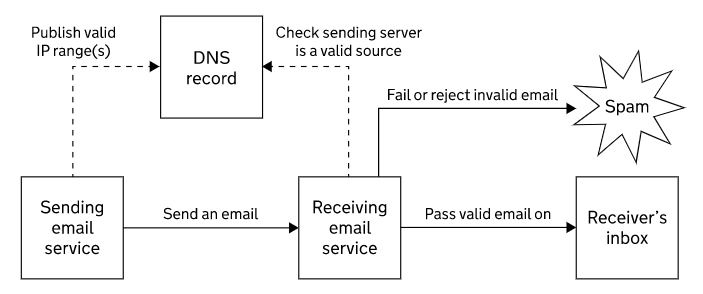
- You publish an SPF record in your domain’s DNS, listing every service that sends email for you.
- Your mail server sends a message. The hidden “envelope sender” (Return-Path) uses your domain.
- The receiving server looks up the SPF record for that domain.
- It compares the IP address of the connecting server with the record.
- It returns a result such as pass, fail, softfail or neutral, which feeds into spam filtering and DMARC.
SPF record examples you can copy
Every SPF record starts with v=spf1 and ends with an “all” rule. In between, you list what is allowed to send.
| Your email setup | Example SPF record |
|---|---|
| Google Workspace only | v=spf1 include:_spf.google.com ~all |
| Microsoft 365 only | v=spf1 include:spf.protection.outlook.com -all |
| Microsoft 365 + own web server | v=spf1 ip4:203.0.113.10 include:spf.protection.outlook.com -all |
| Hosted email on cPanel server | v=spf1 a mx ip4:203.0.113.10 ~all |
| Domain that never sends email | v=spf1 -all |
Replace the example IP address with your own server’s address, and add an include: for every extra service, such as your CRM, billing software or newsletter tool.
What each part of the record means
v=spf1identifies the record as SPF version 1.ip4:andip6:authorise a specific IP address or range.aandmxauthorise the servers listed in your domain’s A or MX records.include:authorises another provider’s servers by reading their SPF record.-all(hard fail) tells receivers to reject anything not listed.~all(soft fail) tells receivers to treat unlisted senders as suspicious. It is useful while you test.+allallows the whole internet to send as you. Never use it.
Common SPF mistakes and how to fix them
- Two SPF records on one domain. Only one is allowed. Merge them into a single TXT record, otherwise SPF returns a permanent error.
- More than 10 DNS lookups. Each
include,a,mx,existsandredirectcounts, including nested includes. Remove unused services or replace includes with IP ranges. - Forgetting a sender. Website contact forms, ERP or Tally email, payment gateways and marketing tools often send as your domain. Test each one.
- Using SPF alone. SPF checks the envelope sender, not the From address people see, and it can break when mail is forwarded. Add DKIM and DMARC.
- Publishing it on the wrong host. The record belongs on the root domain (
@) or on the exact subdomain that sends email.
Pro tip: Start with ~all, watch your DMARC reports for two to four weeks, then move to -all once every legitimate sender passes.
SPF, DKIM and DMARC: how they fit together
| Standard | What it checks | Why you need it |
|---|---|---|
| SPF | Is the sending server allowed? | Blocks direct spoofing from unauthorised servers |
| DKIM | Is the message signed and unchanged? | Survives forwarding and proves content was not altered |
| DMARC | Do SPF or DKIM align with the visible From domain? | Tells receivers to quarantine or reject fakes, and sends you reports |
Since February 2024, Gmail and Yahoo require every sender to authenticate with SPF or DKIM, and bulk senders (around 5,000+ messages a day) must have SPF, DKIM and DMARC. Microsoft applied similar rules to Outlook.com in 2025. Read our guide to DKIM signatures for the next step.
A starter DMARC record looks like this:
_dmarc.yourcompany.com TXT "v=DMARC1; p=none; rua=mailto:dmarc@yourcompany.com"How to check your SPF record
- Run
nslookup -type=txt yourcompany.comin a command prompt, or use any online SPF checker. - Confirm there is exactly one record starting with
v=spf1. - Send a test email to a Gmail address, open it, choose Show original, and check that SPF says PASS.
Frequently asked questions
What is an SPF record in simple words?
It is a list, published in your domain’s DNS, of the servers allowed to send email for your domain. Receivers use it to spot fake senders.
Should I use -all or ~all?
Use ~all while you confirm every legitimate sender is listed, then switch to -all for stronger protection, ideally with DMARC monitoring in place.
Can I have two SPF records?
No. A domain must have only one SPF record. Combine all your include and ip4 entries into a single TXT record.
Will SPF stop my emails going to spam?
It helps a lot, but inbox placement also depends on DKIM, DMARC, your sending reputation and your content. All four need to be right.
Does SPF work when emails are forwarded?
Often not, because the forwarding server is not on your list. DKIM signatures usually survive forwarding, which is why you need both.
Get your email authentication set up properly
Altn Technology configures SPF, DKIM and DMARC for Google Workspace, Microsoft 365 and hosted email, and monitors the reports so genuine mail lands in the inbox. See our business email hosting and Microsoft 365 services, or request a free quote.